


Google Ads Affiliate Tracking: Why It Breaks and How to Fix It
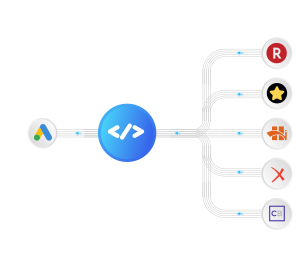
You bid on the keyword. You paid for the click. Then your visitor clicks the affiliate link, the sale happens on the merchant’s site, and Google Ads never finds out. The commission lands in your network dashboard hours later, tied to nothing. Smart Bidding, meanwhile, keeps optimizing toward the cheapest clicks, because clicks are the only signal it can still see.
That blind spot is the whole problem with running Google Ads to affiliate offers. Not the campaigns, not the creative, not the targeting. The tracking chain breaks at the one hop that matters: the moment the visitor leaves your site.
Closing it takes about 25 minutes and no developer. It runs alongside the Google Ads and Analytics tracking you already have, adds the one signal they’re missing, and changes nothing about your campaigns. You can turn it off anytime. This is the explainer; if you want the click-by-click build, jump straight to the Track Affiliate Commissions to Google Ads playbook.
Why Google Ads Goes Blind on Affiliate Traffic
Google’s tracking (the Google Tag) only works on pages you own. It reads the click, it records the visit, and on a normal eCommerce site it fires the conversion on your own checkout. That loop is closed because every step happens on your domain.
Affiliate marketing breaks that assumption. Your money page isn’t yours. The visitor clicks through to the merchant, and the browser trail ends at your domain’s edge. Browsers scope first-party data to the site that set it, so the click ID you collected never crosses to the merchant’s checkout. No conversion comes back to Google Ads through the normal path, and you’re left optimizing on outbound clicks instead of commissions.
Here’s the same journey, tracked the traditional way versus with the loop closed:
| Stage | Traditional Google Tag setup | Loop closed with AnyTrack |
|---|---|---|
| Visitor lands from your ad | Visit tracked, gclid on the URL | Visit tracked, gclid and UTMs collected |
| Clicks your affiliate link | Outbound click, then nothing | Click ID threaded onto the offer link |
| Buys on the merchant’s site | Invisible | Network postback returns the click ID and payout |
| Conversion reaches Google Ads | Never | Sent server-side, matched to the gclid |
| What bidding optimizes for | Cheapest clicks | Actual commissions and earnings per click |
The campaigns don’t change. The traffic doesn’t change. The only thing that changes is whether Google Ads can see the sale it paid for.
Why the Old Fixes Don’t Hold Up
Affiliates have been fighting this blind spot for years. The common workarounds each fail in their own way:
- Manual
gcliduploads. Export click IDs, match them to network payouts in a spreadsheet, upload offline conversions on a lag. It’s slow, it breaks the moment volume grows, and most people quietly abandon it. - Redirect-based trackers. Routing the click through a redirect domain violates Google Ads parallel-tracking rules, trips cloaking policies, and gets blocked by ad blockers for a meaningful share of your traffic. You lose data and risk the account.
- Optimizing on outbound clicks. Bidding toward the offer-link click treats every clicker as equal. It ignores which keywords actually produce buyers, so budget drifts to cheap traffic that never converts.
None of these tell Google Ads which keyword earned the commission. That’s the only signal that makes Smart Bidding work for an affiliate.
How to Actually Close the Loop
Real affiliate conversion tracking threads one identifier through the whole journey, then sends the commission back server-side. Three things have to happen, in order:
The tracked affiliate journey
-
1. Collect the ad click
A visitor arrives from your Google ad. The AnyTrack Tracking Tag on your landing page collects the gclid and campaign UTMs, and generates a first-party click ID for the session.
-
2. Thread the click ID onto the offer link
AutoTag writes that click ID into your outbound affiliate link using each network's own tracking parameter (clickRef on Awin, sid on CJ, subid on many others), so the postback returns it intact. Rename or trim that parameter and the match breaks, which is exactly why AnyTrack maps the right one per network for you. No link editing, no redirect in the path, so the offer URL stays clean and policy-compliant.
-
3. Track the network postback
When the sale converts, the affiliate network fires a server-to-server postback that returns your subid and the payout. AnyTrack matches it to the original click in the Data Store.
-
4. Send it to Google Ads server-side
AnyTrack sends the Purchase to Google Ads through the Conversion API, carrying the gclid collected at the ad click. Google credits the exact campaign and keyword, with no customer data required.
The mechanism is server-to-server the whole way. Nothing depends on a tag firing on the merchant’s checkout, because there isn’t one. The postback URL does the work the browser can’t: it carries the click ID back across the gap the redirect opened.
What Changes When Google Ads Can See Commissions
Once the loop is closed, the same account starts behaving differently, because the bidding models are finally reading revenue instead of clicks:
- Smart Bidding optimizes on payouts. Feed Google
Purchaseevents with commission values and Maximize Conversion Value starts chasing earnings per click, not click volume. Your keyword bids follow the searches that actually pay out, instead of the ones that produce the cheapest clicks. - The redirect blind spot becomes an audience. Every offer-link click is now a tracked
OutboundClickevent. Visitors who clicked through but didn’t buy become a retargeting pool you couldn’t build before. - One report ties payouts to keywords, across every network. Connect all your networks to one AnyTrack property and their commissions land in a single Campaign Report, with revenue and EPC per campaign and per keyword. No more stitching Impact, CJ, Awin, and ClickBank dashboards together by hand. Attribution is click-based, so an organic visit or an email click never steals credit from the ad that earned it (campaign attribution needs your UTM template in place).
Set It Up
The Track Affiliate Commissions to Google Ads playbook walks the full build: installing the Tracking Tag on your presell pages, connecting your affiliate network’s postback, creating the Google Ads conversion actions, and mapping events through the Conversion API. It also covers the prospecting and retargeting campaign stack that runs on the closed loop.
Running the same play on other platforms? The mechanism is identical:
- Track affiliate commissions in GA4 to see which content earns.
- Track affiliate commissions to Facebook Ads for Meta campaigns.
Google Ads Affiliate Tracking FAQ
Common questions about tracking affiliate conversions in Google Ads
Can you use Google Ads for affiliate marketing?
Yes. You run Google Ads to a landing or presell page you own, then link out to the affiliate offer. The catch is measurement: Google Ads can't see the conversion on the merchant's site by default, so you need server-side tracking that returns the sale to Google Ads and credits the keyword that earned it.
How do I track affiliate conversions in Google Ads?
Thread a click ID from the ad click through to the affiliate offer link, let the affiliate network return that click ID with the payout on a server-to-server postback, then send the conversion to Google Ads through the Conversion API. AnyTrack automates every step. The full walkthrough is in our Track Affiliate Commissions to Google Ads playbook.
Do I need access to the merchant's website to track the sale?
No. That's the point of server-to-server postback tracking. The affiliate network stores your click ID when the visitor clicks your link and returns it when the conversion happens. No tag on the merchant's site is required.
Does this comply with Google Ads policy?
Yes. There's no redirect in the final URL, so it doesn't run into parallel-tracking or cloaking restrictions. The offer link your visitor follows stays clean, and the conversion is sent server-side from AnyTrack to Google Ads.
Which affiliate networks work with this?
Any network that can fire a server-to-server conversion postback with your own subid, which covers most CPA and affiliate networks (Impact, ClickBank, Awin, MaxBounty, Everflow, CJ Affiliate, and many more). Networks that only report inside their own dashboard, with no postback, can't return the click ID.
Will retried or multi-step conversions double-count?
No. AnyTrack deduplicates on the network's transaction ID, so a retried postback never counts twice. If your funnel has an order bump, a main offer, and an upsell, each posts back as its own commission on the same click: the payouts add up, but the count doesn't inflate on retries.
What if my checkout is on a separate domain I own?
If the sale happens on your own second domain rather than the network's, that hop needs cross-domain tracking to carry the click ID across it. For a standard affiliate offer on the merchant's site, the network postback handles it.
Stop Optimizing on Clicks You Can’t Value
Every week Google Ads can’t see your commissions is a week of budget drifting toward cheap clicks and away from the keywords that actually earn. The fix isn’t a new campaign structure. It’s closing the tracking loop so Smart Bidding can finally read payouts instead of proxy metrics.
Start your free AnyTrack trial, or follow the step-by-step playbook and have it live in about 25 minutes.

Laurent Malka is the Co-Founder of Anytrack. He was born and raised in Switzerland, and now lives and works in Israel. He is a serial entrepreneur with over 15 years of experience in marketing and business development. Laurent has been a panelist and speaker at numerous digital marketing events including SEMrush and IG Affiliates. He prides himself on his ability to connect the dots across disciplines, industries, and technologies to solve unique challenges.