


Google Ads Conversion Tracking for Affiliates
Why Google Ads Conversion Tracking Matters for Affiliates
Google Ads can be a goldmine for affiliate marketers, but only if the conversions make it back into your account. The problem: unlike eCommerce businesses, affiliates don’t own the page where the conversion happens. The sale closes on the merchant’s website, inside the affiliate network’s reporting, and Google Ads never hears about it.
Without conversion data flowing back, your campaigns run blind:
- Wasted ad spend: budget keeps flowing to keywords and ads that produce clicks, not commissions.
- No Smart Bidding: Google’s bidding algorithms optimize toward whatever signal you feed them. Feed them nothing and they optimize toward nothing.
- No real ROAS: you’re reconciling network dashboards against ad spend in a spreadsheet, days after the money left.
The stakes are measurable. Marketers with a first-party data strategy are 1.5x more likely to outperform competitors (Google/Kantar, 2024), and server-side tagging recovers on average 11% more conversion signals than client-side tracking alone (Google Data, 2025). And those numbers describe advertisers who own their checkout. As an affiliate you start further back: by default, none of your conversions fire anywhere Google Ads can see them.
This guide explains how Google Ads conversion tracking works, why the standard setup is impossible for affiliates, and how postback tracking closes the gap.
What Is Google Ads Conversion Tracking?
Google Ads conversion tracking records the valuable actions your ads drive (purchases, sign-ups, leads) and ties each one back to the ad click that caused it. When it works, you can measure campaign performance, optimize keywords and creatives against real outcomes, and let Smart Bidding adjust bids based on actual revenue instead of proxy metrics.
The standard setup assumes one thing affiliates never have: access to the conversion page. Google’s conversion tag has to load where the sale completes. For an affiliate, that page belongs to the merchant. That’s where server-side tracking comes in.
Why Affiliates Can’t Use Google’s Standard Tracking
You don’t control the merchant’s website
You can’t install Google’s conversion tag on a checkout you don’t own. The merchant runs their own tracking for their own ads; they aren’t adding yours. Every affiliate sale is invisible to your Google Ads account by default.
The redirect chain breaks the trail
Between your landing page and the merchant’s checkout sits the affiliate network’s redirect. The moment your visitor leaves your domain, the browser-side trail goes dark: you have zero visibility until the network reports a commission. We call this the redirect blackout.
Manual workarounds don’t scale
Downloading network reports and importing offline conversions by spreadsheet works, technically. It’s also slow, error-prone, and days behind. Smart Bidding needs conversion signals in near real time; a weekly CSV upload starves it.
The 4 Ways Affiliates Try to Track Conversions
| Method | How it works | Verdict for affiliates |
|---|---|---|
| Google’s conversion tag on the thank-you page | The Google tag loads on the page where the conversion completes | Impossible: the merchant owns that page, and you can’t put your tag on it |
| Manual offline conversion imports | Download network reports, format them, upload to Google Ads by hand | Works but doesn’t scale: slow, error-prone, and too stale for Smart Bidding |
DIY: gclid in the SubID field | Pass Google’s click ID through the network’s SubID parameter, then upload offline conversions keyed to each gclid | The hand-rolled version of postback tracking. One network at a time, no campaign context beyond the click, still a manual import loop, and it breaks silently when a link drops the parameter |
| Server-to-server postback tracking | The network returns each conversion to your tracking platform with the original click ID, and the conversion is sent to Google Ads automatically | The method built for this exact problem: accurate, near real time, no access to the merchant site needed |
How Postback Tracking Works, Step by Step
Here’s the short version: postback tracking threads a unique click ID from your ad click into the affiliate network’s tracking parameter, and the network returns that click ID when the sale happens. Your tracking platform matches it back to the original click and sends the conversion to Google Ads via the Conversion API. No code on the merchant’s site, no manual uploads.
In detail, with AnyTrack:
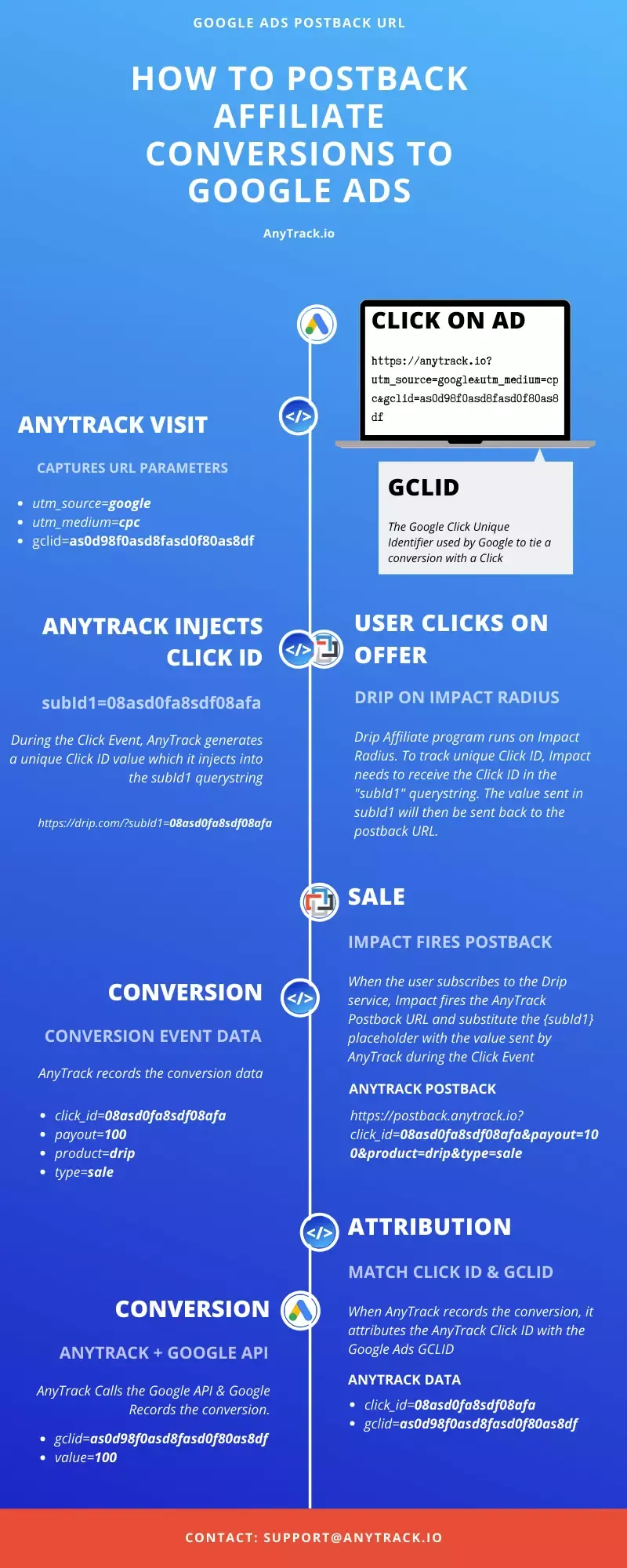
- A visitor clicks your Google ad and lands on your page. Google’s auto-tagging appends the
gclid, and your UTM tracking template passes the campaign, ad group, and keyword. The AnyTrack Tracking Tag collects the session and generates aclick_idfor the visit. - The visitor clicks your affiliate link. AutoTag has already written the
click_idvalue into the network’s designated tracking parameter at page load:sidfor CJ Affiliate,subId1for Impact, and each integrated network’s own parameter name. AnyTrack records theOutboundClickevent. - The visitor buys on the merchant’s site. This is the redirect blackout: you see nothing, but the network is holding your
click_idagainst that click. - The merchant reports the sale to the network, and the network triggers AnyTrack’s postback URL, returning the stored
click_idalong with the commission amount. - AnyTrack matches the returned
click_idto the original click and session in its Data Store, attributes the conversion to your Google Ads campaign, and sends the enriched conversion to Google Ads through the Conversion API, straight into the conversion action you mapped. No CSV, no manual upload. - Google Ads records the conversion against the original ad click. Smart Bidding now optimizes on your actual commissions, by campaign, ad group, and keyword.
The infographic below shows the full loop using Google Ads and the Impact affiliate network as the example:
For a deeper dive into the mechanism, read our Postback URL guide.
What Changes When Google Ads Sees Your Conversions
- Smart Bidding optimizes on commissions, not clicks. Target CPA and Target ROAS strategies finally have real revenue to learn from, and a steady conversion stream is exactly what gets them through the learning phase.
- You kill losers with confidence. Keyword-level conversion data shows which queries produce buyers and which produce tire-kickers.
- ROI stops being a guess. Revenue is attributed per campaign inside Google Ads, not reconciled in a spreadsheet three days later.
- One stream across every network. Postbacks from all your networks reconcile in one dashboard and feed one consistent conversion stream to Google Ads, instead of one patch per network. The same postbacks can feed Google Analytics 4 (GA4) as well: track affiliate commissions in GA4 to see earnings per source, campaign, and page.
- You scale what works. When the numbers are trustworthy, raising budgets is a decision, not a gamble.
How to Set It Up with AnyTrack
- Create your AnyTrack account and install the Tracking Tag on your landing pages. One tag, no code changes beyond pasting it.
- Connect your affiliate networks from the Integration Catalog. For the 91 integrated networks, AutoTag and the postback configuration are handled automatically; for anything else, add the
--CLICK-ID--token to your tracking links manually. - Connect Google Ads and create your conversion actions in Google Ads as “Website” type with manual setup, then map your AnyTrack events to them.
- Add the UTM tracking template AnyTrack provides at the account level in Google Ads, so every conversion carries its campaign context.
- Verify and scale. Check your Events Log to confirm conversions are recorded, then let Smart Bidding do its job.
Most affiliates finish this setup in under an hour: the Tracking Tag is one paste, and integrated networks configure their own postbacks. For a click-by-click walkthrough of the same setup, from AutoTag on your offer links to Smart Bidding on your EPC and payouts, follow the playbook to track affiliate commissions back to your Google Ads campaigns.
Try AnyTrack free: no credit card required.
Frequently Asked Questions
Can I track Google Ads conversions without access to the merchant's website?
Yes. That's exactly what server-to-server postback tracking is for. The affiliate network stores your click ID when the visitor clicks your affiliate link, and returns it to your tracking platform when the conversion happens. The conversion is then sent to Google Ads via the Conversion API. No tag on the merchant's site is required.
What is a postback URL?
A postback URL is a server-to-server URL that an affiliate network calls to notify your tracking platform of a conversion. The call carries the click ID that was stored with the original click, which is what lets the conversion be matched back to the exact ad click that drove it. See our Postback URL guide for the full breakdown.
How does the conversion get matched back to my Google Ads campaign?
Three identifiers, three jobs. The gclid is Google's own receipt for the ad click, the AnyTrack click_id is what survives the round trip through the affiliate network, and the UTM tracking template carries the campaign, ad group, and keyword labels. Google's auto-tagging handles the gclid automatically; don't add it manually to your UTMs, as that can break tracking.
Why don't my conversions show up in Google Ads immediately?
AnyTrack sends conversions in near real time, but Google Ads processes them on its own schedule: last-click conversions appear within about 3 hours, other attribution models take up to 15 hours, and brand-new conversion actions can take 3 to 5 days to start displaying data.
What happens if the network sends the same conversion twice?
AnyTrack deduplicates before sending anything to ad platforms. It uses the transaction ID and other event attributes to identify duplicates: if the same transaction arrives more than once, the second instance is marked as deduplicated and never reaches Google Ads. Your conversion column doesn't double-count.
What if the commission is only confirmed days after the click?
The click doesn't expire when the browser session ends. AnyTrack stores the original click in its Data Store and matches the postback whenever it arrives, within your configured attribution window (1, 7, or 30 days, or the maximum available). Google Ads then applies its own attribution rules and processing on its side.
What happens if the network reverses the commission after the conversion was sent to Google Ads?
Nothing changes, and that's worth knowing before you scale. AnyTrack records the conversion as it was reported at conversion time: if the network later reverses or refunds the commission, the conversion stays in your AnyTrack reports and remains counted in Google Ads. AnyTrack doesn't send conversion adjustments or retractions to any ad platform. In most cases the click still produced a real buyer — chargeback and fraud reversals are the exception — and that's the signal Smart Bidding optimizes on. If your offers carry a high reversal rate, your network dashboard shows it: check it monthly and derate your target ROAS accordingly. Full details in Commission Reversals & Refunds.
Can affiliates use Google Ads Enhanced Conversions?
Usually not. Enhanced Conversions match conversions to signed-in Google users via hashed customer data such as an email or phone number, and most affiliate networks don't pass that data back in postbacks. Postback tracking with a click ID is the reliable path for affiliates; Enhanced Conversions apply when you own the conversion data, such as lead forms on your own site.
Which affiliate networks does this work with?
AnyTrack has 91 published affiliate network integrations, including Impact, CJ Affiliate, Awin, ClickBank, and Rakuten, where the click ID threading and postback are configured automatically. For networks without a native integration, the --CLICK-ID-- token in your tracking link does the same job manually.
Final Thoughts: Stop Paying for Conversions You Can’t See
Every day your Google Ads account runs without conversion data is another day of bids optimized on clicks instead of commissions. The campaigns don’t need to change. The traffic doesn’t need to change. What changes is Google’s ability to see what’s actually making you money.
Postback tracking closes that loop, and AnyTrack sets it up without a developer: connect your networks, connect Google Ads, and let your bidding optimize on real revenue.

Laurent Malka is the Co-Founder of Anytrack. He was born and raised in Switzerland, and now lives and works in Israel. He is a serial entrepreneur with over 15 years of experience in marketing and business development. Laurent has been a panelist and speaker at numerous digital marketing events including SEMrush and IG Affiliates. He prides himself on his ability to connect the dots across disciplines, industries, and technologies to solve unique challenges.