


Client-Side vs Server-Side Tracking: What's the Difference?
On this page
Your Marketing Runs on Context From Two Places
Your ad platforms, your CRM, and your reports decide who to reach next from the same context: which clicks turned into customers. That context comes from two places, and each one sees half of it.
Client-side tracking records what happens in the visitor’s browser: the ad click, the UTM parameters, the pages, the forms, and first-party data such as cookies, IP address, and device.
Server-side tracking records the conversion on the server where it happens, such as your store, your CRM, or an affiliate network. It carries customer, transaction, product, and event data, with no browser involved.
Client-side tracking sees the visit. Server-side tracking sees the customer and the sale. The value sits in the server that joins both: it applies rules, resolves identity, and stores the result. A setup you can trust runs both and connects them with a click ID.
Client-Side vs Server-Side Tracking at a Glance
An event that starts in the visitor’s browser is client-side, even when a server relays it later. An event that starts on the server that records the sale, the booking, or the closed deal is server-side.
| Client-side tracking | Server-side tracking | |
|---|---|---|
| Event origin | Visitor’s browser | Server that records the conversion: store, CRM, network, or the tracking server |
| Sender | Script on the page: Tracking Tag, pixel, or Google tag | Store, CRM, or affiliate network, through an integration, Postback URL, webhook, or API |
| Tracked data | The visit and first-party data: source, UTM parameters, ad click IDs, cookies, IP address, device, pages, clicks, forms. Sometimes customer data | Customer, transaction, product, and event data: order, commission, booked call, closed deal |
| Ad blockers | ❌ Request can be stopped | ✅ No browser request to stop |
| Safari tracking prevention | ⚠️ Script-set cookies expire after 7 days, or 24 hours after a visit from a link with a click ID | ✅ No browser cookie needed |
| Tab closed before thank-you page | ❌ Conversion lost | ✅ Conversion still recorded |
| Off-site sales | ❌ No script on that site | ✅ Recorded where the sale happens |
| Ad click ID | ✅ Read from the landing-page URL | ❌ Not alone: needs the click ID from the browser |
Look at the last row. It’s the reason the two methods work as a pair.
How Client-Side Tracking Works
Client-side tracking runs on a script that loads with your page. AnyTrack’s Tracking Tag, the Meta Pixel, and the Google tag all work this way.
The script reads the landing-page URL, sets first-party identifiers, and records what the visitor does: page views, outbound clicks, and form submissions. It also collects first-party data, such as cookies, IP address, and device, and customer data when a form collects it.
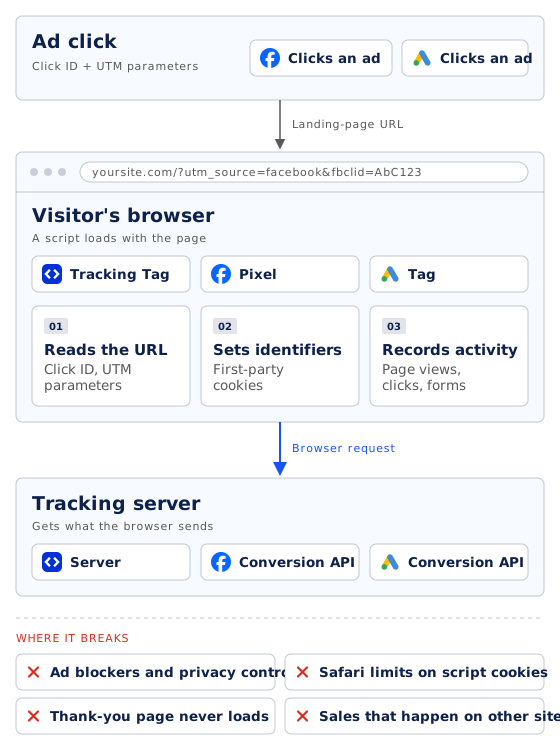
The browser is where the journey starts. When someone clicks your ad, the ad platform adds its click ID to the landing-page URL (gclid for Google Ads, fbclid for Meta), and your UTM parameters arrive in the same URL. A client-side script reads them the moment the page loads.
Conversion events run in the same place. Here’s a Purchase event sent with the Meta Pixel on an order confirmation page (Meta Pixel conversion tracking):
// Runs in the visitor's browser, on the order confirmation page
fbq('track', 'Purchase', {
  value: 115.00,
  currency: 'USD',
  content_ids: ['SKU-301'],
  content_type: 'product'
}, { eventID: 'order-1001' });
That snippet runs only if the page loads and the browser lets the request through. Client-side tracking breaks in four places:
- Ad blockers and privacy controls: the request to the tracking server never leaves the browser.
- Safari’s tracking prevention: WebKit deletes cookies created in JavaScript after 7 days without a visit to the site. When it detects click IDs added to the link, it caps those cookies at 24 hours (WebKit). A buyer who comes back next week looks like a new visitor.
- The thank-you page that never loads: the buyer closes the tab during the upsell, or pays on a checkout you don’t control. A reload of the same page counts the sale a second time.
- Conversions that happen somewhere else: an affiliate sale on the merchant’s checkout, a deal marked closed-won in HubSpot, an order taken on the phone. Your script isn’t on those pages.
It can also credit the sale to a payment page or booking tool, such as PayPal or Calendly, instead of your campaign. Moving that pixel into Google Tag Manager doesn’t change where it runs.
How Server-Side Tracking Works
Server-side tracking records the conversion on the server where it happens and sends it server-to-server. No browser is part of the step, so an ad blocker has nothing to block.
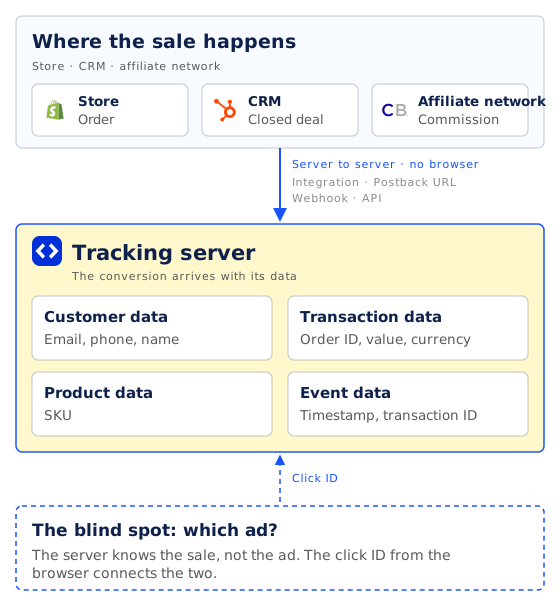
The affiliate network credits the sale and calls your Postback URL. Shopify sends the order through its webhook. HubSpot reports that a deal moved to a new stage.
Each of these events carries data the browser never sees: customer data (email, phone, name), transaction data (order ID, value, currency), product data (SKU), and event data (timestamp, transaction ID) (Data Collection).
The server can also be the tracking platform’s own. A tracking server stores everything collected client-side and server-side in one place.
The conversion reaches your tracking platform in one of four ways:
- Native integration: a built-in connection to a store, funnel builder, CRM, or affiliate network, such as Shopify, WooCommerce, ClickFunnels, GoHighLevel, or ClickBank.
- Postback URL: a URL the affiliate network or tracker calls when it credits a sale. Affiliate marketers call this S2S, for server-to-server.
- Incoming webhook: a URL that a platform posts events to, directly or through Zapier or Make.
- API: your own server, app, or checkout sends the event. In AnyTrack, that’s the Collect API.
Server-side tracking has one blind spot. The server knows the sale, but it doesn’t know the ad. An affiliate network knows which affiliate sent the buyer. It doesn’t know which of your Meta ads or Google keywords did.
Some parameters exist only in the browser: ad click IDs and cookies. To connect the sale to the ad, the conversion must carry an identifier that started there: the click ID.
With server-side Google Tag Manager, the browser sends each event to a server container you host. The container relays it to Google, Meta, and other vendors. Google calls this server-side tagging.
Why You Need Both: Hybrid Tracking
Hybrid tracking uses client-side and server-side tracking together and joins them with a click ID. The browser collects the context of the visit. The server delivers the conversion. The click ID proves they belong to the same person.
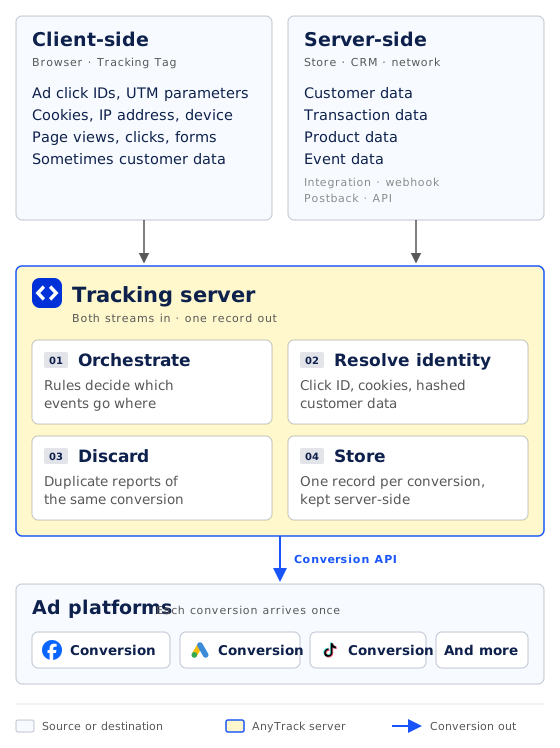
The server in the middle does the work that neither side can do alone:
- Orchestrate: rules decide which events go where.
- Resolve identity: click ID, cookies, and hashed customer data tie each conversion to one visitor.
- Discard: duplicate reports of the same conversion are dropped.
- Store: the server keeps the result, so the data stays on the server side.
AnyTrack can also run fully server-side, with conversions from integrations, webhooks, Postback URLs, and the Collect API. The browser still matters for the parameters that only exist there, so keep the Tracking Tag for attribution.
Here’s the flow for an affiliate offer. A store, a CRM, or a funnel builder follows the same four steps:
-
1. Collect the visit
A visitor clicks your ad and lands on your page. The Tracking Tag records the session with its UTM parameters and the ad platform's click ID.
-
2. Tag the next step
The visitor clicks your affiliate link. AutoTag adds the AnyTrack click ID to the link in the parameter the network expects, such as subId1 on Impact, sid on CJ, or clickref5 on Awin. The network stores it with the click.
-
3. Match the conversion
The visitor buys on the merchant's site. The network's server sends the conversion back through the Postback URL with the click ID, and AnyTrack matches it to the original session.
-
4. Send it to your ad platforms
AnyTrack attaches the stored ad click ID and customer data, then sends the conversion to each connected ad platform through its Conversion API.
Hybrid tracking needs one more rule: count each conversion once. When the Tracking Tag and a webhook both report the same purchase, AnyTrack merges them before anything reaches an ad platform. It compares the click ID, the customer data, and the transaction ID (Deduplication).
AnyTrack also sends an event ID with each conversion. A platform that receives both a browser event and a server event, such as TikTok, uses it to merge the two into one (Conversion API).
The Tracking Tag keeps each session’s source. The click ID connects the session to the conversion.
Which Conversions Need Server-Side Tracking?
Every funnel gains from both methods. Some funnels can’t work without the server half. Find yours in the table:
| Your funnel | Where the conversion happens | Client-side tracking alone | Server-side source |
|---|---|---|---|
| eCommerce store | Your Shopify or WooCommerce checkout | ⚠️ Misses blocked and closed-tab orders | The store integration |
| Affiliate offers | The merchant’s checkout, credited by the network | ❌ Can’t see the sale | The network’s postback |
| Lead generation | Your CRM, often after a sales call | ⚠️ Sees the lead, not the closed deal | The CRM integration or a webhook |
| Funnels with upsells | An external checkout such as SamCart or ClickFunnels | ⚠️ Misses buyers who leave during the upsell | The funnel builder’s integration |
| Booked calls | Calendly or another booking tool | ⚠️ Can credit the booking tool instead of your ad | The booking tool’s integration |
Here’s what that looks like in your stack:
- Your store: the store integration sends every order, including orders from shoppers who block scripts. Orders the browser never reported are one reason Meta Ads Manager shows fewer purchases than Shopify.
- Your affiliate offers: AutoTag puts the click ID in each network’s own parameter:
subId1on Impact,sidon CJ,clickref5on Awin,tidon ClickBank hop links (AutoTag parameters). Any network that can send a postback with that value works. - Your lead generation: the HubSpot integration creates an AnyTrack Click ID contact property, so the click ID stays on the contact. When the deal moves to a new stage weeks later, the conversion still connects to the ad (HubSpot).
- Your client accounts: give each client its own Property. You can limit a team member to specific Properties and to read-only access, so each client sees only their own reports (Team Management).
Without server-side tracking, these sales never reach your reports or your ad platforms, unless someone uploads them by hand.
Where Server-Side Tagging Fits
Server-side tracking brings the conversion in. Server-side tagging sends it out, to Meta, Google, TikTok, and other ad platforms through their Conversion API. In short: tracking in, tagging out.
People mix the two up because both run on a server. Keep them apart when you evaluate a tool. A setup that relays browser events through a server does the tagging half. It still depends on the browser to see the conversion.
Here’s the same purchase as the Pixel snippet above, sent from a server. It’s a POST to https://graph.facebook.com/{API_VERSION}/{PIXEL_ID}/events, the Meta Conversions API (Using the Conversions API):
{
  "data": [{
    "event_name": "Purchase",
    "event_time": 1792656000,
    "event_id": "order-1001",
    "action_source": "website",
    "event_source_url": "https://yourstore.com/thank-you",
    "user_data": {
      "em": ["SHA256_HASH_OF_THE_EMAIL"],
      "client_user_agent": "Mozilla/5.0 (iPhone; ...)",
      "fbc": "fb.1.1792652400000.AbCdEfGhIjKl"
    },
    "custom_data": { "value": 115.00, "currency": "USD" }
  }]
}
Meta uses user_data to match the event to a user. It uses event_id to merge this event with a Pixel event that carries the same eventID, so the purchase counts once (Meta deduplication).
With AnyTrack, you don’t write this payload. AnyTrack builds it, hashes the customer data, and attaches fbc, fbp, and the event ID. With the Conversion API on, the Facebook Pixel sends PageView only, and every conversion goes through the Conversion API (Conversion API).
Remove any Purchase snippet you added by hand, or Meta receives the same sale twice (Deduplication).
Server-Side Tracking vs Server-Side Tagging explains the split, and where Google Tag Manager and Stape fit.
How AnyTrack Runs Client-Side and Server-Side Tracking Together
AnyTrack runs the full hybrid setup from one Tracking Tag and your existing conversion sources:
- Client-side: the Tracking Tag collects each session with its UTM parameters and ad click IDs. AutoTag adds the AnyTrack click ID to outbound links and forms, including affiliate links, in each network’s own parameter.
- Server-side: conversions come in from native integrations, Postback URLs, incoming webhooks, or the Collect API.
- In between: AnyTrack stores every event in its Data Store, matches each conversion to its session by click ID, and removes duplicates. If the click ID is missing, it tries other identifiers, such as the email address.
- Out: on Starter and above, AnyTrack sends each conversion to your connected ad platforms through the Conversion API.
Starter and above add the Conversion API. Custom integrations through the Collect API, an incoming webhook, or a Postback URL start on Personal (Plan Comparison).
Every conversion your ad platforms never hear about is a customer their bidding can’t learn from. Client-side tracking tells you where the click came from. Server-side tracking makes sure the sale shows up.
Run both, connect them with a click ID, and your reports and your ad platforms work from the conversions that happened. See Server-Side Tracking for the full feature.
Client-Side vs Server-Side Tracking FAQ
Common questions about client-side, server-side, and hybrid tracking
What is the difference between client-side and server-side tracking?
Client-side tracking runs a script in the visitor's browser and records the visit: the traffic source, UTM parameters, ad click IDs, page views, form submissions, and first-party data such as cookies, IP address, and device.
Server-side tracking records the conversion on the server where it happens, such as a store, a CRM, or an affiliate network, and sends it server-to-server with customer, transaction, product, and event data. A tracking server then joins both streams, resolves identity, and stores the result.
Is server-side tracking more accurate than client-side tracking?
For conversions, yes. A server-side conversion doesn't depend on the browser, so ad blockers, closed tabs, and pages that never load don't drop it, and a page reload doesn't trigger it again.
For the source of the visit, you still need client-side tracking: the server doesn't know which ad started the journey unless the click ID travels with the conversion.
Can ad blockers block server-side tracking?
No. An ad blocker runs in the browser and stops requests the browser makes. A server-side conversion travels from the store's, CRM's, or network's server to the tracking platform's server, so the browser never makes that request. Ad blockers can still stop the client-side script that records the visit.
Do I still need a tracking script if I use server-side tracking?
Yes. The browser script records the session and the click ID that a server-side conversion needs for attribution. In AnyTrack, the Tracking Tag does this job.
AnyTrack can run fully server-side, but ad click IDs and cookies exist only in the browser. Without the tag, server-side conversions still arrive, but AnyTrack can't attribute them to specific ad clicks.
Is server-side tracking the same as the Conversion API?
No. Server-side tracking brings a conversion in from the system where it happened. The Conversion API sends a conversion out to an ad platform, such as Meta or Google. That outbound step is called server-side tagging. See Server-Side Tracking vs Server-Side Tagging.
What is hybrid tracking?
Hybrid tracking uses client-side and server-side tracking together. The browser script records the visit and creates a click ID. The conversion source sends the sale server-side with that click ID, and the tracking platform matches the two. It then removes duplicates, so each conversion counts once.
Is server-side Google Tag Manager the same as server-side tracking?
No. With server-side Google Tag Manager, the browser sends each event to a server container that you host, and the container relays it to vendors. The event still starts in the browser, so a sale the browser never sees never reaches the container. Google calls this server-side tagging.
How do UTM parameters work with server-side tracking?
UTM parameters arrive in the landing-page URL, so the client-side script collects them when the session starts. A server-side conversion usually arrives without them. It carries the click ID instead, and the tracking platform matches it to the session that holds the UTM values.
Which AnyTrack plans include server-side tracking?
All plans. The Free plan tracks server-side with one conversion source integration. Starter and above allow unlimited conversion sources and add the Conversion API. Custom integrations through the Collect API, an incoming webhook, or a Postback URL start on Personal. See Plan Comparison.

Laurent Malka is the Co-Founder of Anytrack. He was born and raised in Switzerland, and now lives and works in Israel. He is a serial entrepreneur with over 15 years of experience in marketing and business development. Laurent has been a panelist and speaker at numerous digital marketing events including SEMrush and IG Affiliates. He prides himself on his ability to connect the dots across disciplines, industries, and technologies to solve unique challenges.
Related posts

 Laurent Malka
The Best AnyTrack Alternatives in 2026 (Compared by Use Case)
 Laurent Malka
Server-Side Tracking vs Server-Side Tagging: What's the Difference?
 Laurent Malka