


Server-Side Tracking vs Server-Side Tagging: What's the Difference?
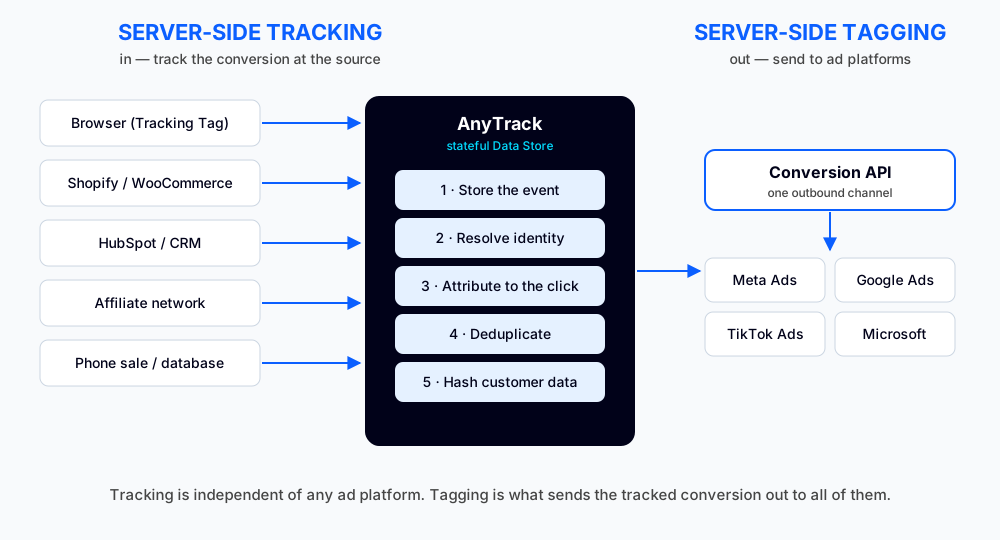
“Server-side tracking” and “server-side tagging” get used as if they mean the same thing. They don’t. They’re opposite ends of the same chain, and mixing them up is why so many marketers stand up a server-side setup and still can’t trust their numbers. One is about getting the conversion in, accurately. The other is about sending it out, to your ad platforms. You need both, but they solve different problems, and most “server-side” tools only do half the job.
We build AnyTrack, so treat this as a disclosure. The goal here is to make the distinction clear enough that you can tell what any tool, including Google Tag Manager, Stape, or AnyTrack, actually does for you.
The one-sentence difference
Server-side tracking brings the conversion in. Server-side tagging sends it out. Everything else is detail.
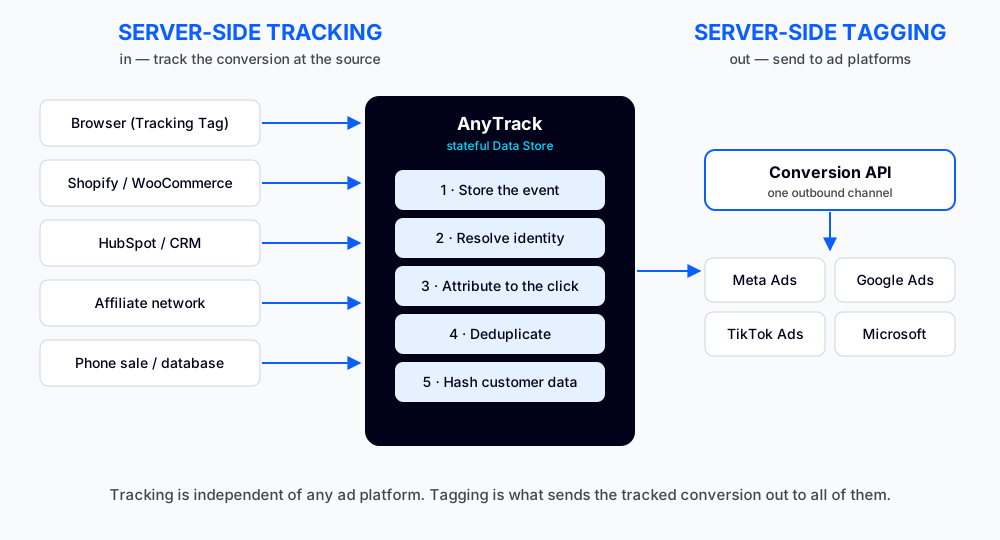
Read it left to right. On the left, the conversion happens somewhere real: a purchase in Shopify, a deal moving to closed-won in HubSpot, a sale confirmed by an affiliate network, an order taken over the phone. Tracking is the job of recording that event and getting it into your system accurately. In the middle, the event is stored, attributed to the original click, deduplicated, and prepared. On the right, tagging delivers it to Meta, Google, TikTok, and Microsoft so their bidding algorithms can learn from it.
The two halves are independent. You can track a conversion perfectly and never send it anywhere. You can also relay garbage to an ad platform very efficiently. Quality comes from the left half. Most tools live on the right.
What server-side tracking actually does
For years, the default way to track a conversion was a pixel on the thank-you page. It loads in the browser when the buyer lands on the confirmation screen, and it tells the ad platform a sale happened. It works until it doesn’t, and it breaks in three ways at once:
- It misses. Ad blockers, Safari ITP, and iOS privacy controls stop the request. The sale still happened in your checkout. The ad platform just never heard about it.
- It double-counts. A refresh, a back-button, or a re-used confirmation URL fires the same event twice.
- It mis-attributes. The moment your funnel hops domains, the source gets rewritten. Send someone to a Calendly booking page and back to a thank-you page, and your tracking reports the conversion came from Calendly, not the Facebook campaign that paid for the click.
Server-side tracking fixes the root cause by recording the conversion where it’s real: on the server of your store, CRM, affiliate network, or any database-driven system, sent in through a Postback URL, an incoming webhook, or an API. No browser required, so there’s nothing for an ad blocker to block.
The important part: server-side tracking is independent of any ad platform. It isn’t “for Facebook and Google.” It tracks the conversion accurately first. Which ad platforms eventually receive it is a separate, downstream decision. And because more and more conversions never reach a thank-you page at all (phone sales, CRM lifecycle changes, upsells on external checkouts, renewals, refunds), tracking where the event truly happens is the only way to see them.
What server-side tagging actually does
Server-side tagging is the other half: taking a conversion you’ve tracked and sending it out to ad platforms through their Conversion API (Meta, Google, TikTok, and Microsoft each have one). Instead of the browser telling the platform about the sale, your server tells the platform’s server directly.
This is the part most people mean when they say “we went server-side.” It’s real and it’s valuable: server-to-server delivery is more reliable than a browser pixel, and you can attach hashed customer data to improve match quality. But on its own, tagging only answers “how do I deliver an event?” It says nothing about whether the event was tracked accurately, attributed to the right campaign, or counted once. Feed it a mis-attributed conversion and it will deliver that mistake perfectly.
Where Google Tag Manager fits
Google Tag Manager (GTM) is a tag management system. Instead of hard-coding the Meta Pixel, GA4, and your Google Ads tag into your site, you drop in one GTM container and manage all those tags from a dashboard using tags (the vendor code), triggers (when it fires), and variables (the data it reads).
GTM comes in two flavors, and the difference matters here.
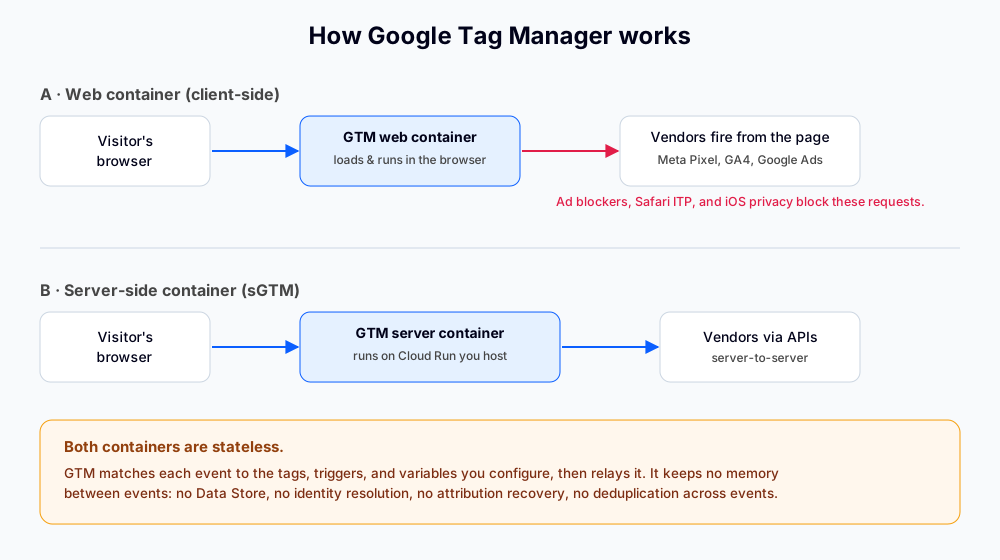
- The web container runs in the visitor’s browser. It’s still client-side, so the tags it fires (Meta Pixel, GA4, Google Ads) are exposed to the same ad blockers and browser restrictions as any pixel. Moving your tags into GTM doesn’t make them server-side.
- The server-side container (sGTM) runs on a server you provision, usually Google Cloud Run. The browser sends events to your own tagging server on a subdomain you control, and the server relays them to vendors through their APIs. This recovers some of the data a browser pixel loses and gives you first-party context.
Here’s the catch that the word “server” hides: GTM server-side is still stateless. It matches each incoming event to the tags and triggers you configured, then relays it. It keeps no memory between events. There’s no store of past clicks, no identity resolution, no attribution recovery, and no deduplication across separate events. It’s a very capable relay. It is tagging infrastructure, not a tracking system.
The Stape “GTM wrapper,” and its limits
Standing up sGTM yourself means a Google Cloud project, billing, a Cloud Run service, DNS for a custom subdomain, and a server container full of clients, tags, and templates. That’s real engineering. Stape exists to remove that pain: it hosts the GTM server container for you, hands you a subdomain or custom domain, and adds a library of power-ups and templates. If you want sGTM without managing Cloud Run, Stape is a sensible way to get it.
But it’s important to be precise about what Stape is. It’s a hosting wrapper around Google Tag Manager’s server container. It removes the DevOps. It does not change the architecture.
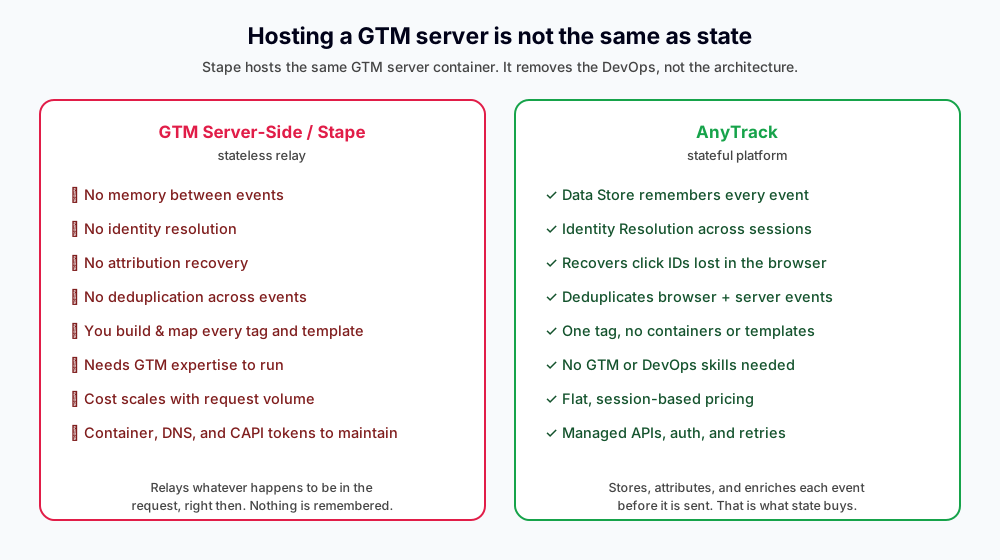
What you still own with a Stape or DIY sGTM setup:
- It’s still GTM, so you still need GTM skills. You build the server container, configure clients (the GA4 client, for example), set up each vendor tag (Meta CAPI, Google Ads, TikTok), wire triggers and variables, and often install custom templates from the gallery. This is technical work, and it’s ongoing.
- It’s still stateless. No Data Store means no memory. A conversion that fires a week after the click goes out without the original
gclidorfbclid, because nothing remembered the click. Browser and server events for the same sale can’t be deduplicated against stored history. Identity can’t be stitched across sessions, devices, or domains. - It relays events; it doesn’t track them. This is the one people miss. sGTM and Stape relay the events they receive. They don’t natively reach into HubSpot for a deal-stage change, accept an affiliate network’s postback and attribute it to a click, or pull an offline phone sale into the right campaign. The actual tracking of those server-side conversions is still on you to build.
- Cost scales with volume. Pricing is tied to request or event volume, so the more traffic you send, the more you pay, and power-ups are extra. A custom domain also raises CNAME-cloaking questions that Meta and Google can flag.
So Stape solves a hosting problem inside the tagging half of the chain. It’s a good answer to “how do I run a GTM server without DevOps?” It is not an answer to “how do I track conversions accurately wherever they happen?” That’s the tracking half, and a wrapper around GTM doesn’t add it.
Stateless vs stateful: the part that decides your data
The real dividing line isn’t browser vs server. It’s stateless vs stateful. GTM Server-Side, Stape, and DIY setups are stateless: collect an event, relay it, forget it. A stateful platform stores every event first, then enriches it before sending. That’s what unlocks the things a stateless relay structurally can’t do:
- Attribution recovery. When a conversion fires server-side days after the click, a stored record of that click can be reattached. A stateless relay has no record to reach back to.
- Deduplication. When the browser and the server both report the same purchase, stored event history lets you count it once instead of relying on the ad platform to guess.
- Identity resolution. A buyer clicks on mobile, returns on desktop, and converts on a different domain. State stitches those into one person. Stateless sees three strangers.
- Retroactive enrichment. A lead status changes a week later, and the historical click and session context get attached before the event goes out. A stateless relay can’t reach backwards in time.
This is why “we already have server-side” and “we already have accurate tracking” are not the same sentence.
How AnyTrack does both
AnyTrack is built as the stateful layer that runs the whole chain. One Tracking Tag collects first-party click and session context in the browser. Server-side, AnyTrack connects to the backend of your conversion sources (Shopify, WooCommerce, HubSpot, affiliate networks, and more) and tracks the real event where it happens. Every event lands in the Data Store, where AnyTrack resolves identity, attributes the conversion to the original click, deduplicates, and hashes customer data. Then, and only then, it tags the conversion out to every ad platform you’ve connected through their Conversion API.
No Cloud project, no server container, no templates, no DNS. Tracking in, tagging out, in one setup most marketers finish inside an hour.
So which do you need?
You need both, but in order. Tagging without accurate tracking just delivers bad data faster. If you’re choosing tools, ask what each one does on the tracking side, not just the tagging side. A GTM wrapper like Stape is a fine way to host the outbound half. It won’t track your CRM, your affiliate networks, or your phone sales, and it won’t remember anything. If accurate, attributed, deduplicated conversions are the goal, you want a stateful platform that owns the inbound half too.
Server-Side Tracking vs Tagging FAQ
Common questions about the difference between server-side tracking and server-side tagging
Is server-side tracking the same as the Conversion API?
No. The Conversion API is an outbound channel for sending conversions to an ad platform, which is the tagging half. Server-side tracking is the inbound half: recording the conversion accurately at its source before anything is sent. Don't equate "server-side" with "CAPI."
Does server-side tracking only work for Facebook and Google?
No. Tracking is independent of any ad platform. AnyTrack tracks the conversion accurately first, then sends it to every ad platform you've connected. The tracking is identical whether you deliver to one platform or six.
Is Stape server-side tracking?
Stape is a hosting wrapper for Google Tag Manager's server-side container. It handles the tagging (outbound delivery) half and removes the DevOps of running sGTM. It doesn't track conversions from your CRM, affiliate networks, or offline sales, and it keeps no state, so it isn't server-side tracking on its own.
Do I still need the browser Tracking Tag if I track server-side?
Yes. The browser tag collects the click ID, session, and source that make attribution possible. AnyTrack merges that with the server-side conversion, then deduplicates the two so each sale counts once.
What does 'stateful' mean and why does it matter?
Stateful means every event is stored before it's sent. That memory is what enables attribution recovery for delayed conversions, deduplication across browser and server, and identity resolution across devices and domains. Stateless relays like GTM Server-Side and Stape can't do these, because they don't remember past events.

Laurent Malka is the Co-Founder of Anytrack. He was born and raised in Switzerland, and now lives and works in Israel. He is a serial entrepreneur with over 15 years of experience in marketing and business development. Laurent has been a panelist and speaker at numerous digital marketing events including SEMrush and IG Affiliates. He prides himself on his ability to connect the dots across disciplines, industries, and technologies to solve unique challenges.