


Data-Driven Attribution Is Only as Good as the Paths Google Can See
On this page
Google didn’t ask most advertisers whether they wanted data-driven attribution. It removed the alternatives.
First click, linear, time decay, and position-based are gone from Google Ads. Google’s own documentation confirms that conversion actions using those models “have been upgraded to use data-driven attribution.” What’s left is data-driven attribution and last click.
So the model changed. For most accounts, the tracking behind it didn’t.
That’s the problem worth your attention. Data-driven attribution is a machine learning model that reads conversion paths. Say your paths end at a form submission on your landing page, while the sale closes in HubSpot two weeks later.
The model does exactly what you’d expect. It gets very good at finding you cheap leads and stays blind to what produced revenue. It’s working as designed, on incomplete input.
What Data-Driven Attribution Actually Does
Google’s About data-driven attribution page is short and worth reading literally. The model compares the paths of customers who convert with the paths of customers who don’t, and it “identifies patterns among those ad interactions that lead to conversions.”
Touchpoints that raise the probability of a conversion earn more credit. Three consequences follow:
- Credit becomes fractional. One conversion gets split across the interactions on the path, which is why you start seeing decimals in your Conversions column instead of whole numbers.
- The model is yours alone. Google Analytics 4 states it plainly: the model is “specific to each advertiser and each key event.” It’s trained on your account’s paths, not an industry average.
- Coverage is Google’s surfaces. Data-driven attribution reads website, store visit, and Google Analytics conversions from Search (including Shopping), YouTube, Display, and Demand Gen, and it counts video engagements, not just clicks.
For inputs, GA4’s attribution documentation lists what the algorithm weighs: time from the key event, device type, number of ad interactions, order of ad exposure, and type of creative assets.
AnyTrack’s part is the conversion data the model reads, which the data-driven attribution doc covers field by field.
How much data it needs
Google says all conversion actions qualify for data-driven attribution regardless of volume. It still recommends at least 200 conversions and 2,000 ad interactions in supported networks within a 30-day period for the model to work well.
Some conversion action types have a stricter bar, per the Switch to DDA page. They need 3,000 ad interactions and 300 conversions over 30 days to become eligible, then 2,000 interactions and 200 conversions every 30 days to stay eligible.
Below those numbers the model still runs, and Google says it improves with more data. Google also adds a line most people skip: “Depending on data availability, the last click and data-driven attribution models can have the same results in certain situations.”
If you’re running one Search campaign with 40 conversions a month, switching models won’t reveal anything. Your data volume is the constraint.
Google Ads and GA4 Both Use It, and They Don’t Mean the Same Thing
Data-driven attribution shows up in two Google products that measure different things. Marketers reconcile the two numbers every Monday and conclude their tracking is broken. Usually it isn’t.
| Google Ads | Google Analytics 4 | |
|---|---|---|
| Google ad clicks | ✓ Credited | ✓ Credited |
| Video engagements | ✓ Credited | ✓ Credited |
| Organic channels | ✗ Not credited | ✓ With the paid and organic setting |
| Direct traffic | ✗ Not credited | ✗ Excluded unless the entire path is direct |
| Models available | Last click, data-driven | Data-driven, paid and organic last click, Google paid channels last click |
| Default | Data-driven for most conversion actions | Paid and organic channels can receive credit |
| Reporting delay | Up to 3 hours with last click, up to 15 hours with other models | About 12 hours for daily data, processing up to 48 hours |
The practical read: Google Ads answers “which of my ads contributed to this sale.” GA4 answers “which of all my channels contributed to this sale.” Both can run data-driven attribution and still disagree, because they’re modeling different sets of touchpoints.
The Google Ads integration doc and the attribution delays doc list the processing windows above.
Worth knowing before you flip anything: switching models changes how credit is distributed, and Smart Bidding acts on that credit. Google’s guidance is to test first with the Model comparison report and assess the effect on return before you commit.
Better conversion data produces better-informed bidding, and that’s what moves CPA, the number you have to defend upward.
Google’s data freshness page says attribution credit can change for up to 12 days after a key event. Its attribution page gives 7 days for reattribution.
The Model Learns from Paths That Reach It. Yours Probably Stop Early.
Here’s where most accounts lose the value of the model. Data-driven attribution needs two things your funnel is quietly failing to deliver: the full path, and the conversion that actually matters.
Failure one: the conversion happens somewhere Google isn’t watching.
Modern funnels don’t end on the page that the ad landed on. They hop.
| Where the visitor ends up | What that platform records | Google Ads by default | What AnyTrack records |
|---|---|---|---|
| SamCart checkout, often on its own domain | Order completed, with upsells and order bumps | ✗ Click only | ✓ One Purchase for the order |
| Calendly booking page | Meeting booked | ✗ Click only | ✓ Lead by webhook |
| Typeform quiz | Completed submission | Partial, if a tag survives the hop | ✓ Lead by webhook |
| Systeme.io funnel step | Opt-in, sale, upsell | Partial, if a tag survives the hop | ✓ FormSubmit, Purchase, Upsell |
| GoHighLevel or HubSpot pipeline | Contact created, lifecycle stage change, deal won | ✗ No browser event | ✓ Lead, then a deal event with its value |
| Affiliate network | Commission, days later, on the merchant’s site | ✗ No browser event | ✓ Conversion by Postback URL |
The browser can’t bridge those hops on its own. First-party storage is scoped to the domain that set it. The moment a visitor crosses from your landing page to a checkout on another domain, the identifiers collected from the ad click sit behind a wall the new domain can’t see.
That’s browser design, not a bug in your setup.
Failure two: you’re feeding the model a proxy.
This one costs more money and gets noticed less. If your Google Ads conversion action is “lead form submitted,” data-driven attribution credits the campaigns that produce form submissions, and Smart Bidding buys more of them.
Whether those leads close is information the model never receives. That’s why lead generation accounts so often scale a campaign that looks efficient and sells nothing.
The fix is to send the event that carries the money: the closed-won deal with its value attached, rather than the raw lead. We walk that setup end to end in Feed offline lead status to Google Ads.
Once real deal value reaches Google, value-based bidding has something to maximize other than lead count.
The gap runs the other way too. Against Fospha’s own model, last click undervalues Google’s upper-funnel campaigns by 14x across Fospha’s clients: 12.8x for Demand Gen and 15.9x for YouTube (May 2025). That’s vendor data, not an industry average.
It still shows the distortion data-driven attribution was built to correct, and what it can’t correct while half the path is missing.
Smart Bidding uses primary conversion actions. A secondary action stays out of the Conversions column, and Smart Bidding ignores it. Custom goals are the one exception. See primary and secondary conversions.
How AnyTrack Feeds Data-Driven Attribution
AnyTrack’s job here is narrow and specific: make sure Google receives complete paths and real conversions, so the model has something worth learning from.
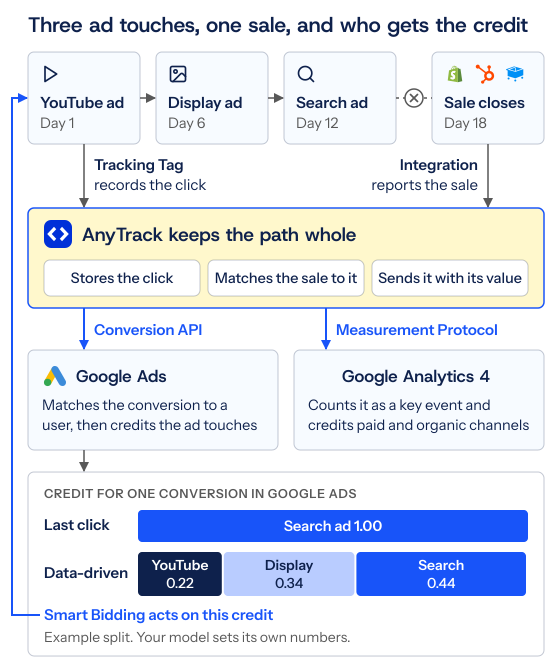
1. Thread one identifier through every hop
When the Tracking Tag loads on your page, it gives the visitor a Click ID and carries it into every downstream system. Each platform receives it under its own parameter:
| Platform | Where the Click ID lands | Automatic |
|---|---|---|
| HubSpot | The AnyTrack Click ID contact property | ✓ On HubSpot forms |
| Typeform | at_click_id | ✓ With AutoTag |
| Calendly | utm_term and sfid | ✓ With AutoTag |
| GoHighLevel | _atid | ✗ Add the field to each form |
| SamCart | atclid, as a hidden custom field | ✗ Add the parameter and the field |
| Any standard HTML form | A hidden field carrying --CLICK-ID-- | ✗ Add the field |
Calendly is the clearest case for why the identifier has to travel. The booking completes on Calendly’s page, so a tag on your own thank-you page never sees it.
The booking reaches AnyTrack by webhook instead, carrying the Click ID it was tagged with. That’s what connects the meeting to a campaign.
Two things put the campaign context on the click before any of that runs. Google’s auto-tagging adds the gclid, and the UTM tracking template AnyTrack gives you adds the source, medium, campaign ID, ad group, and keyword as dynamic placeholders.
That’s what lets the AnyTrack Campaign Report, GA4, and Google Ads talk about the same campaign instead of three differently spelled versions of it. If your team has never agreed on how those values are written, fix that first (UTM parameters best practices).
2. Store the click, then recover it later
Every event lands in the Data Store. When HubSpot reports a deal stage change 18 days after the ad click, Identity Resolution connects it to the original session and attaches the gclid collected then.
A stateless pass-through tool can’t do this, because it has no record of the click. That stored click is what lets Google connect a late conversion to the ad interactions on its path.
3. Send the conversion server-side, with the customer data attached
AnyTrack delivers conversions to Google Ads through the Conversion API, from server to server, so ad blockers and browser privacy restrictions don’t get a vote.
Click Create and map conversion actions in AnyTrack, and it creates one conversion action for each standard event and maps it. To map an action that already exists in Google Ads, the action must be type Website with Manual Setup.
The same delivery carries Enhanced Conversions data. Google matches SHA-256 hashed first-party data to signed-in Google accounts, and AnyTrack handles the hashing and the field mapping.
Since April 2026, Google combines Enhanced Conversions for all data sources in one setting. That setting covers both kinds of conversion:
- Website conversions that complete on your site or checkout (Shopify, SamCart, ClickFunnels, custom checkouts).
- Offline conversions that complete later in your CRM or your sales pipeline.
Email is the field that carries the most weight. Send phone, name, and postal code as well when your conversion source supplies them. Those fields help Google match the conversion to a user, and attribution to your ads comes after that match.
So expect little from that setting. The conversion still reaches Google Ads with the gclid from the original click.
4. Deduplicate before delivery, not after
When the Tracking Tag and a server-side event both describe the same purchase, AnyTrack resolves them into one conversion before it reaches Google. Ad platforms often can’t dedupe these on their own, since the event attributes rarely match.
Double-counted conversions train the model on inflated data. That’s worse than a gap, because it looks like success.
5. Give GA4 the same events
AnyTrack streams conversions to Google Analytics 4 server-side through the Measurement Protocol, including conversions from sources that never touch a browser.
One step people miss: GA4 marks only a few events as key events by default, such as purchase. For the rest, open Admin, click Events under Data display, and click the star next to the event. Without a key event, your GA4 model has nothing to model.
None of this needs a developer. It’s one Tracking Tag plus integration connections.
What this looks like in your stack
- eCommerce store. Google Ads and your checkout stop reporting two different truths (sending Shopify purchases to Google Ads), because the purchase Google receives is the one your store recorded, sent server-side with the customer data attached and deduplicated against the browser event.
- Lead generation with a CRM. The lifecycle stage change or closed-won deal in HubSpot or GoHighLevel goes back to Google carrying the original
gclid, so the model learns from deals rather than raw leads. - Info-product funnels. The Click ID survives the hop from advertorial to lander to an external SamCart or Systeme.io checkout, so the buyer who leaves before the thank-you page still counts. SamCart sends the whole order in one event. On Systeme.io and ClickFunnels, Combined Orders groups the main offer with its bumps and upsells into one
Purchaseat the full value. - Client accounts. Each client sits in its own property, so a messy inherited stack gets to a clean number without touching anyone else’s data.
When to Use Data-Driven Attribution
Switch it on, and trust it, when:
- You run more than one Google surface. Search plus YouTube, Demand Gen, or Display. If every conversion arrives from a single Search campaign, there’s nothing to distribute.
- You clear the volume bar. 200 conversions and 2,000 ad interactions per 30 days is the working floor.
- Your buying cycle has more than one touch. Considered purchases, high ticket offers, and B2B pipelines are where fractional credit tells you something last click can’t.
- You’ve fixed the input first. The model is only worth switching to once your conversion action reflects revenue, not a proxy for it.
- Smart Bidding is doing the work. Bid strategies act on the credit the model assigns, so the model and the bidding have to agree on what a conversion is.
In Google Ads, open Goals, then Summary under Conversions. Click the conversion action, click Edit settings, and read the Attribution model field before you plan a switch.
When Last Click Is Still the Right Call
Last click answers a different question, and there are cases where its answer is the one you need:
- Reconciliation. When you’re checking Google’s numbers against your checkout, your CRM, or your affiliate network statement, you want one whole conversion in one place, not 0.34 of a conversion in three.
- Affiliate payouts. Your network’s commission report counts whole conversions. Modeled credit doesn’t reconcile against it.
- Low volume. With little data, Google says the two models can produce the same result anyway. Take the simpler one.
- Debugging a setup. When you’re verifying that conversions arrive at all, fractional credit and a processing delay of up to 15 hours make a slow feedback loop even slower.
- Single-channel accounts. One campaign type, one path shape, nothing to redistribute.
AnyTrack’s own reporting sits on this side of the line deliberately. The Campaign Report offers First Ad Click and Last Ad Click, switchable from the Attribution dropdown, both click-based, with no post-view.
We flipped that dropdown on a live account and wrote up what moved in First Click vs Last Click Attribution. That report is the deterministic record you check the model against.
Last click in Google Ads credits the last-clicked ad and keyword. Paid and organic last click in GA4 credits the last channel and ignores direct traffic.
Run Both. One Optimizes, One Verifies.
The setup that works in practice looks like this:
- Google Ads: data-driven attribution. This is what Smart Bidding learns from. Give it complete paths and revenue-weighted conversions.
- GA4: data-driven attribution, paid and organic scope. Your cross-channel view, including the organic and email touches Google Ads can’t see.
- AnyTrack: Last Ad Click. The deterministic number you reconcile against, in real time, before Google has finished processing.
Expect the three to differ, and stop treating the difference as an error. Google Ads credits clicks and video engagements across its own surfaces. AnyTrack credits clicks only, on every source. GA4 credits every channel and drops direct traffic unless the whole path is direct.
Three different questions, three correct answers.
If you run client accounts, this is also the argument that survives a Monday call. Each client gets its own property and its own deterministic number. When the Google Ads figure disagrees, you can say precisely why instead of promising to look into it.
AnyTrack records each conversion in real time. Google Ads can take up to 15 hours on data-driven conversions, and GA4 processing can take up to 48 hours.
The Setup Checklist
Google Analytics 4 delivery starts on the Personal plan. The Free plan tracks your funnel and imports campaign metrics, but it sends no conversions to ad platforms. See the plan comparison.
- Install the Tracking Tag on every page in the funnel, including landing pages that hand off to an external checkout.
- Connect your conversion sources: store, checkout, funnel builder, CRM, scheduler, affiliate networks.
- Connect Google Ads in Tracking Pixels and click Create and map conversion actions. Map custom events, such as won deals, yourself.
- Turn on Enhanced Conversions in Google Ads, and confirm your conversion source supplies email at minimum.
- In your Google Ads pixel in AnyTrack, turn on Enable server-to-server tracking under Conversion API.
- Install the UTM tracking template at the Google Ads account level, and leave auto-tagging on. Keep
utm_idin the template: it carries the campaign ID, and Google shows (not set) for the UTM parameters you leave out (why utm_id matters). - Connect GA4, turn on Enable server-to-server tracking, and mark your events as key events.
- Remove any legacy Google tags from your funnel and tag manager, so you’re not sending the same conversion twice.
- Give it 30 days of clean data before you judge what the model tells you.
Once that’s running, data-driven attribution is finally modeling your business instead of the fragment of it that survived the browser. Until then, you’re paying Google’s machine learning to study an incomplete file.
Every day you optimize on truncated paths is a day of budget decisions made from data that stops before the money changes hands. Start tracking free and close the loop this week.
Sources: Google Ads Help on data-driven attribution, attribution models, Switch to DDA, data freshness, and enhanced conversions. Google Analytics Help on attribution, attribution settings, data freshness, and key events. Fospha’s Demand Gen and YouTube Playbook.

Laurent Malka is the Co-Founder of Anytrack. He was born and raised in Switzerland, and now lives and works in Israel. He is a serial entrepreneur with over 15 years of experience in marketing and business development. Laurent has been a panelist and speaker at numerous digital marketing events including SEMrush and IG Affiliates. He prides himself on his ability to connect the dots across disciplines, industries, and technologies to solve unique challenges.
Related posts
 Laurent Malka
Postback URL: Real Example, Parameters & How to Test It
 Laurent Malka
Mobile Is Now the Majority of Your Traffic. Your Tracking Doesn't Know It.
 Laurent Malka