


Postback URL: Real Example, Parameters & How to Test It
A postback URL is a URL that one server calls to notify another server that a conversion happened. In affiliate marketing, the network calls your tracking platform’s postback URL when a sale or lead converts, passing the click ID and conversion data as query string parameters. No browser, no cookies, no pixel on a thank-you page.
That’s the definition. The part that actually costs marketers money is the execution: which parameter carries the click ID, what the URL looks like when it’s built correctly, and how to test it so conversions don’t silently disappear.
This guide covers the whole loop: a real postback URL example, a step-by-step setup, the parameters that matter, and what ad platforms like Google Ads and Facebook use instead of postbacks.
What is a Postback URL?
A postback URL is generated by a conversion tracking platform. The affiliate network calls that URL whenever a conversion takes place, and passes contextual data along with it: the click ID that started the journey, the conversion value, the transaction ID, and the conversion type.
Why are Postback URLs important?
Postback URLs are important for two big reasons. First, they let performance marketers track and attribute conversions to their ad campaigns without placing a tracking pixel on the merchant’s thank-you page. Second, they don’t rely on cookies, which browsers such as Firefox and Safari block or restrict.
In essence, they give marketers the ability to instantly attribute conversions to their campaigns. As soon as the ad network (ex: Google Ads) receives the conversion data, it allows the marketer to apply advanced bid strategies based on any conversion metrics.
For example, the marketer can optimize their affiliate campaigns on Google Ads according to ROI (Return on Investment) or a given Target CPA (cost per acquisition). The full loop is packaged as a playbook: track affiliate commissions back to your Google Ads campaigns, from AutoTagged offer links to Smart Bidding on commissions and EPC.
How Postback URLs Work
The tracking process works according to the following timeline:
- When a visitor clicks an affiliate link, the marketer’s tracking platform appends a unique
click_idto the link:url.foo?click_id=123 - The merchant server records the
click_id=123 - Upon conversion, the merchant calls the marketer’s postback URL and appends the same
click_idto the URL.
https://postbackurl.io?click_id=123asdfsadf&commission=30&cu=USD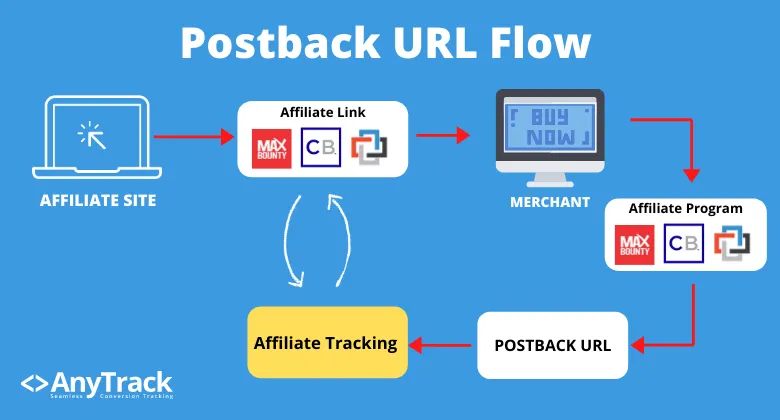
Another example, with product context attached:
https://postbackurl.io?click_id=123&price=10.00&product=iPhonePostback URL Example
Here’s what a real postback URL looks like when your tracking platform generates it, before you paste it into an affiliate network:
https://t1.anytrack.io/XXXXXXXX/collect/my-network?click_id=${sub1}&amount=${payout}&transaction_id=${txn_id}Reading it left to right:
- The base URL identifies your tracking account. It’s the address the network calls every time a conversion happens.
click_id=${sub1}is the tracking key.${sub1}is the network’s macro: at conversion time, the network substitutes it with the click ID it stored when the visitor clicked your tagged link. That stored value is the one thing that survives the redirect chain to the merchant’s site, and the postback is what carries it back. Without this parameter, the conversion can’t be matched to anything.amount=${payout}carries the commission or sale value.transaction_id=${txn_id}gives the conversion a unique ID so it isn’t counted twice.
When a conversion happens, the network replaces the macros with real values and calls the URL:
https://t1.anytrack.io/XXXXXXXX/collect/my-network?click_id=at_cl1d_abc123xyz&amount=32.50&transaction_id=TXN-98421¤cy=USDPostback URL Parameters
These are the parameters you map in a postback URL. The click ID is the only one that must be present. The rest enrich the conversion.
| Parameter | What it carries | Required? |
|---|---|---|
click_id | The stored click ID that matches the conversion to the session | Yes |
amount | Revenue or commission value | Recommended |
transaction_id | Unique conversion ID that prevents duplicate counting | Recommended |
currency | Currency code such as USD or EUR | Optional |
event | Custom event name such as Sale or Trial | Optional |
In AnyTrack, the amount value also sets the conversion type: an amount of 0 records a Lead, and anything greater records a Purchase.
Macro syntax varies by network. Some write ${sub1}, others {clickid}, #s2#, or [sub1]. Always copy the exact syntax from your network’s postback documentation.
How to Create a Postback URL (Step by Step)
The process is the same on any conversion tracking platform. Here’s the loop, with AnyTrack as the example:
- Find your network’s tracking parameter. Every network reserves a query string parameter that carries your click ID:
tidon ClickBank,subId1on Impact,sidon CJ Affiliate,sub1on Everflow,aff_subon HasOffers and Tune. Your network’s documentation lists it under “SubID”, “tracking parameter”, or “S2S tracking”. - Tag your affiliate links. Append that parameter to your links with a click ID placeholder, so the network can store a unique click ID for every visitor:
https://network.com/offer123?sub1=--CLICK-ID--. AnyTrack’s AutoTag replaces the--CLICK-ID--placeholder with the real click ID at click time, and tags recognized links from 90+ integrated networks automatically. - Get your postback URL. In AnyTrack: Integrations, then Add Integration, then pick your network (or Custom Integration for anything else). The platform generates the postback URL with the parameter mapping built in.
- Paste it into the network’s postback settings. Look for a field called Postback URL, Callback URL, S2S Tracking, Server-to-Server, or Webhook in your affiliate account. Paste the URL exactly as generated: removing parameters you don’t recognize breaks tracking.
- Test it. Trigger a test conversion (or a real one) and watch your platform’s event log. In AnyTrack, a green status in the integration’s Events Log means the postback arrived and matched a click ID. The two errors you’ll actually meet: Missing click_id (your links aren’t tagged) and No match found (the Tracking Tag isn’t installed, or the visitor never clicked a tagged link).
The full walkthrough with screenshots lives in the Postback URL Integration guide.
What are Postback URLs synonyms?
While the term postback URL is generally accepted in the digital marketing industry, some companies use different names.
- Server to server pixel (Cake)
- S2S tracking pixel
- Callback URL (Maxbounty)
- Cookieless tracking (CJ Affiliates)
- Server based pixels
Regardless of what they’re called, the best affiliate programs have this feature enabled by default for their affiliates.
One name that gets lumped in but isn’t a synonym: Conversion API. A postback URL brings conversions into your tracking platform from an affiliate network. A Conversion API is how a tracking platform sends conversions out to an ad platform such as Facebook or Google Ads. Same server-to-server idea, opposite directions. More on this below.
The Entities Connected by Postback URL
There are two entities involved in the conversion tracking flow:
- The marketer: sends the traffic and receives the conversion data.
- The affiliate network: receives the traffic and sends the conversion data.
The Systems Involved in the Process
The affiliate network software
In general, the affiliate network has an event notification service responsible for calling the affiliate marketer’s postback URL.
The conversion data platform
Affiliate marketers use a conversion data platform, which provides the postback URL that gets placed in the affiliate network’s system.
What is the Postback URL Scope?
Depending on the affiliate network, the scope can be either global or offer based.
- Global: The network triggers the URL for any conversion tracked under the affiliate account.
- Offer Based: The affiliate is required to set a postback URL for each offer.
The Postback URL Tracking Key
In order for the tracking process to work, both parties need to use a common key.
In general, the key is called a click_id, but the parameter name varies depending on the tracking system.
The conversion data platform auto-generates the click_id value for every click, and appends it to the offer link’s subid query string parameter.
The query string parameter is defined by the affiliate network and varies by network.
During the click:
When a visitor clicks on an affiliate link, the affiliate tracking software appends the query string parameter to the affiliate link. The query string parameter can be something like subid.
https://www.your-affiliate-link.com?affid=123&subid=DynamicValueDuring the conversion:
https://postbackurl.io?event=purchase&payout=10&click_id=DynamicValueThe affiliate network records the dynamic value and ties it to the visitor’s session and buying journey.
When a conversion occurs, the affiliate network calls the postback URL and appends the dynamic value.
When the affiliate tracking system receives the postback call, it checks the value against its database, and upon finding a match, it records the conversion event. ClickBank’s IPN runs this exact flow: the playbook to track ClickBank commissions back to your TikTok ads walks it end to end, from AutoTagged hop link to the TikTok Conversion API.
Conversion Data Context
While the conversion event itself is important, the meaningful data is in the conversion context.
What is the conversion data context?
The conversion data context is everything that gives more insight into what the conversion is about. It can be the conversion type, the conversion value, the conversion name, or the product name.
In the example below, you can see what Partnerize sends to the AnyTrack postback URL.
{
  "query": {
    "publisher_id": "1101lxxx45",
    "customer_type": null,
    "country": "US",
    "referer": "https://www.website.foo/",
    "search_engine_id": null,
    "publisher_commission": "700.00",
    "creative_id": "1011l39891",
    "creative_type": "6",
    "conversion_reference": "190xx510600",
    "currency": "USD",
    "tracking_method": "ip",
    "value": "1,299.00",
    "campaign_id": "1101lxx561",
    "user_agent": "Mozilla/5.0 (iPhone; CPU iPhone OS 13_5_1 like Mac OS X) AppleWebKit/605.1.15 (KHTML, like Gecko) Version/13.1.1 Mobile/15E148 Safari/604.1",
    "search_keyword": null,
    "conversion_time": "1594526385",
    "conversion_id": "1101l258443168",
    "publisher_reference": "vp9CFjpm7EDzmiTd08p2Pj",
    "partnerize": "1",
    "conversion_type": "1",
    "metadata_query_string": "container_version:124",
  },
  "body": {
    "publisher_id": "110xxx2245",
    "customer_type": null,
    "country": "US",
    "referer": "https://www.website.foo",
    "search_engine_id": null,
    "publisher_commission": "700.00",
    "creative_id": "1011l39891",
    "search_keyword": null,
    "conversion_time": "1594526385",
    "conversion_id": "1101l258443168",
    "publisher_reference": "vp9CFjpm7EDzmiTd08p2Pj",
    "conversion_type": "1",
    "metadata_query_string": "container_version:124"
  }
}
Postback URL HTTP Call Types
Affiliate networks call postback URLs with a GET or POST request. GET passes everything in the query string; POST can also carry a JSON body, as in the examples below.
Postback URL Post Methods
The affiliate network can append the conversion context in an arbitrary way, or by substituting {placeholders} with the conversion data.
The arbitrary way
This method is the simplest for the affiliate network, because it posts the entire conversion data to the postback URL.
In this case, the affiliate provides a “naked” postback URL:
https://t1.anytrack.io/useridXXX/collect/partnerizeWhen the conversion is tracked, Partnerize posts the following JSON data to the postback URL:
{
  "query": {
    "publisher_id": "1101lxxx45",
    "customer_type": null,
    "country": "US",
    "referer": "https://www.website.foo/",
    "search_engine_id": null,
    "publisher_commission": "700.00",
    "creative_id": "1011l39891",
    "source_referer": "https://top10-harleydavidson.foo/best-bikes-for-agencies/?utm_source=google&utm_medium=cpc&utm_content=9356xx06333&utm_term=best%20harleydavidson&campaignId=9252xx6620&adGroupId=xx565406333&feedItemId=&targetId=kwd-725419666&locInterestMs=&locPhysicalMs=1014255&matchType=e&network=g&device=m&deviceModel=&deviceType=mobile&campaignType=search&creativeId=416555874420&keyword=best-bikes-harleydavidson&placement=&category=&cacheBuster=4435128554743338465&adPosi",
    "advertiser_reference": null,
    "creative_type": "6",
    "conversion_reference": "190xx510600",
    "currency": "USD",
    "tracking_method": "ip",
    "value": "1,299.00",
    "campaign_id": "1101lxx561",
    "user_agent": "Mozilla/5.0 (iPhone; CPU iPhone OS 13_5_1 like Mac OS X) AppleWebKit/605.1.15 (KHTML, like Gecko) Version/13.1.1 Mobile/15E148 Safari/604.1",
    "search_keyword": null,
    "conversion_time": "1594526385",
    "conversion_id": "1101l258443168",
    "publisher_reference": "vp9CFjpm7EDzmiTd08p2Pj",
    "partnerize": "1",
    "conversion_type": "1",
    "metadata_query_string": "container_version:124",
    "items": [
      {
        "item_code": null,
        "item_id": "1100l397567423",
        "item_sku": null,
        "item_commission": "700.0000",
        "item_type": "S",
        "item_gp": "0.0000",
        "item_publisher_commission": "700.00",
        "item_meta": "id:7056-5/0/name:harleydavidson, agency: 11.5\" firm/brand:harley davidson",
        "item_status": "1",
        "item_value": "1299.0000",
        "item_category": null,
        "item_vertical": null
      }
    ],
    "query_string": "campaign:1101l561/currency:USD/conversionref:19000510600/voucher:attentivesms225/container_version:124/[id:7056-5/0/name:harleydavidson%20classic%20bike,%20agency%20:%2011.5\"%20firm/value:1299/quantity:1/brand:harleydavidson]"
  },
  "body": {
    "publisher_id": "110xxx2245",
    "customer_type": null,
    "country": "US",
    "referer": "https://www.website.foo",
    "search_engine_id": null,
    "publisher_commission": "700.00",
    "creative_id": "1011l39891",
    "source_referer": "https://top10-harleydavidson.foo/best-bikes-for-agencies/?utm_source=google&utm_medium=cpc&utm_content=93565406333&utm_term=best%harleydavidson&campaignId=9252596620&adGroupId=93565406333&feedItemId=&targetId=kwd-725419666&locInterestMs=&locPhysicalMs=1014255&matchType=e&network=g&device=m&deviceModel=&deviceType=mobile&campaignType=search&creativeId=416555874420&keyword=best-bikes-harleydavidson&placement=&category=&cacheBuster=4435128554743338465&adPosi",
    "advertiser_reference": null,
    "creative_type": "6",
    "conversion_reference": "19000510600",
    "currency": "USD",
    "tracking_method": "ip",
    "value": "1,299.00",
    "campaign_id": "1101l561",
    "user_agent": "Mozilla/5.0 (iPhone; CPU iPhone OS 13_5_1 like Mac OS X) AppleWebKit/605.1.15 (KHTML, like Gecko) Version/13.1.1 Mobile/15E148 Safari/604.1",
    "search_keyword": null,
    "conversion_time": "1594526385",
    "conversion_id": "1101l258443168",
    "publisher_reference": "vp9CFjpm7EDzmiTd08p2Pj",
    "conversion_type": "1",
    "metadata_query_string": "container_version:124",
    "items": [
      {
        "item_code": null,
        "item_id": "1100l397567423",
        "item_sku": null,
        "item_commission": "700.0000",
        "item_type": "S",
        "item_gp": "0.0000",
        "item_publisher_commission": "700.0000",
        "item_meta": "id:7056-5/0/name:harley davidson, new model: 11.5\" firm/brand:harley davidson",
        "item_status": "1",
        "item_value": "1299.0000",
        "item_category": null,
        "item_vertical": null
      }
    ],
    "query_string": "campaign:1101l561/currency:USD/conversionref:19000510600/voucher:attentivesms225/container_version:124/[id:7056-5/0/name:xxxx:%2011.5\"%20firm/value:1299/quantity:1/brand:harley-davidson]"
  }
}
This method can be challenging, since most affiliate tracking software doesn’t have the ability to ingest the data and remap it to its own parameters. Yet this method is very powerful, as you get the entire dataset from which you can pick and choose which data to use.
Postback placeholders
This method requires the affiliate marketer to provide a prebuilt postback URL that includes query strings and {placeholders}. The placeholders are automatically substituted with real values by the affiliate network when the postback URL is called.
Impact Postback URL:
https://t1.anytrack.io/useridxxx/collect/impact?ActionTrackerName={ActionTrackerName}&CampaignId={CampaignId}&CampaignName={CampaignName}&MediaPartnerId={MediaPartnerId}&MediaPartnerName={MediaPartnerName}&SubId1={SubId1}&SubId2={SubId2}&SubId3={SubId3}&AdId={AdId}&ActionTrackerId={ActionTrackerId}&ActionId={ActionId}&Amount={Amount}&Currency={Currency}&Payout={Payout}&EventDate={EventDate}&Status={Status}&StatusDetail={StatusDetail}&LandingPageUrl={LandingPageUrl}&SharedId={SharedId}&PromoCode={PromoCode}&RefCustomerCountry={RefCustomerCountry}At run time, the Impact event notification service calls the postback URL while substituting the {placeholders} with real values.
https://t1.anytrack.io/useridxxx/collect/impact?Status=PENDING&AdId=735510&EventDate=2020-07-11T22:17:49-04:00&RefCustomerCountry=US&PromoCode=julypromo&SharedId=&Amount=547.50&MediaPartnerId=xxx&CampaignName=capaign&MediaPartnerName=agancyname&ActionId=9556.4575.353598&LandingPageUrl=https://www.campaign.fooTracking Links
The tracking mechanism starts when a visitor clicks a tracking link, so it’s important to follow standard URL formats, where the subid parameter can be appended anywhere after the ?.
AnyTrack’s redirectless tracking feature AutoTags product links at page load, which enables marketers to use any type of link.
Base URL:
The default offer link provided by the affiliate network.
https://www.your-affiliate-link.com?aff_id=asdf&oid=offer1Deeplink:
URL that allows marketers to redirect visitors to a specific page within the merchant’s website.
https://www.your-affiliate-link.com?aff_id=asdf&oid=offer1&u=https://anytrack.io/blogShort url:
If an affiliate network provides a URL shortening feature, it is crucial that the dynamic parameter can be appended after the URL. Since the parameter is auto-generated for every click, it has to be visible and appended as a query string.
https://bit.ly/xxxxxxxNaturally, the subid parameter and its value have to be passed through to the regular affiliate link.
Do Google Ads, Facebook, or Google Analytics Have Postback URLs?
No. Ad platforms don’t hand you a postback URL the way affiliate networks do. Their server-to-server door is the Conversion API: Facebook calls it the Conversions API, Google Ads works through Enhanced Conversions and the Google Ads API, TikTok calls it the Events API, and Google Analytics 4 receives server-side events through the Measurement Protocol.
So the marketer’s flow runs in two legs:
- Inbound: the affiliate network calls your tracking platform’s postback URL with the click ID and the conversion data.
- Outbound: the tracking platform matches the conversion to the original ad click and sends it to each ad platform through that platform’s Conversion API.
If you searched for “Google Ads postback URL” or “Facebook postback URL”, the second leg is what you actually need. AnyTrack runs both legs automatically: postbacks in, attributed conversions out to Google Ads, Facebook Ads, and TikTok Ads, with customer data hashed and formatted to each platform’s spec. The Conversion API guide explains how that loop closes.
Testing Postback URLs
Because backend servers trigger postback URLs, the public never sees them. That’s great for user privacy, but it makes testing harder: you can’t watch the data move from server A to server B, so when something breaks, you’re left tweaking parameters blind.
The fix is an event log on the receiving end. In AnyTrack, every incoming postback lands in the integration’s Events Log with a status: green when it matched a click ID, and a named error when it didn’t. The Postback URL Integration guide covers the full testing flow.
In the example below, you can see the entire dataset HasOffers sends to an AnyTrack postback URL.
{
  "query": {
    "affiliate_id": "4479",
    "payout": "4.48500",
    "aff_unique2": null,
    "source": null,
    "aff_unique1": null,
    "aff_unique4": null,
    "aff_unique3": null,
    "aff_click_id": "ej2kaIZSEV1rhNu8ohhqtt",
    "aff_unique5": null,
    "advertiser_id": "2",
    "offer_url_id": "51",
    "goal_id": "5",
    "datetime": "2020-05-19 12:46:16",
    "offer_file_id": "0",
    "currency": "USD",
    "offer_ref": "PRO",
    "aff_sub2": null,
    "aff_sub3": null,
    "aff_sub4": null,
    "aff_sub5": "ej2kaIZSEV1rhNu8ohhqtt",
    "advertiser_ref": null,
    "transaction_id": "10219dbfbe3c8802f63db008acd29c",
    "device_id": "{device_id}",
    "file_name": null,
    "ip": "35.161.196.166",
    "offer_id": "2",
    "offer_name": "PRO Subscription",
    "affiliate_name": "Agency Ltd",
    "affiliate_ref": null,
    "hasoffers": "tradingview",
    "aff_sub": null,
    "adv_sub": null,
    "session_ip": "92.170.247.132",
    "sale_amount": null
  }
}
Conclusion
Postback URLs are an essential tool in every digital marketer’s toolbox. Because they track conversions without a thank-you page and don’t rely on cookies, they remain the backbone of conversion tracking across the affiliate ecosystem. The postback is only half the loop, though: if you buy Meta traffic, this playbook shows how to track affiliate commissions back to your Facebook Ads campaigns, rebills included, through the Conversion API.
If you are an affiliate network, providing postback URL tracking to your affiliates and publishers carries plenty of benefits. When you help your affiliates measure their traffic accurately, you get better traffic and better performance in return: a win-win.
Frequently Asked Questions
Postback URL popular questions answered
What is a Postback URL in advertising?
A postback URL is a URL that points to a conversion tracking server. The sending server (usually an affiliate network) calls it when a conversion occurs, notifying the tracking server of the conversion event. The postback URL carries query string parameters that the receiving server ingests to record the conversion and the data associated with it.
How are conversions tracked with Postback URLs?
In a scenario where an affiliate marketer sends traffic to an affiliate offer, the tracking flow works according to the following process:
Prerequisites:
- An affiliate tracking software: a platform like AnyTrack that the affiliate marketer uses.
- An affiliate management software: a platform like Tune or Cake that enables merchants to manage their affiliate program.
The postback tracking flow:
- The flow starts when a visitor clicks on the affiliate offer link.
- Upon the click, the affiliate tracking software generates and records a unique
dynamic_valuesuch as1a2b3c4d, and appends it to the offer linksubidparameter:https://example.com?affId=xyz&subid=1a2b3c4d - The affiliate network server collects and stores the
subidvalue. - Upon conversion, the affiliate network server makes a POST request to the affiliate tracking software's postback URL:
https://anytrack.io/p?click_id=1a2b3c4d&sum=10 - The affiliate tracking software records the event and attributes it to the initial click using the
1a2b3c4dvalue. - Finally, the affiliate tracking software adds the conversion data to its reports, and can also send it to third-party systems for further analysis or attribution.
What is a postback request?
A postback request occurs between two servers, and ties conversion events happening on the sending server to web or mobile engagement events tracked by the receiving server.
1. The sending server: where the conversion event takes place. Usually an affiliate network's server, an eCommerce platform, or a merchant.
2. The receiving server: a server that can ingest the conversion data.
Whenever an event such as a purchase happens on the sending server, it sends a POST or GET request to the postback URL provided by the receiving server. Upon receiving the event data, the receiving server responds to confirm the data arrived with or without errors.
What are the synonyms of Postback URL?
- Server to Server tracking (Cake)
- S2S pixel
- Conversion URL
- Webhook URL (Zapier, Make)
- Event Notification URL (Impact, Rakuten)
- Server side pixel tracking
- Callback URL (Maxbounty)
Note that Conversion API is not a synonym: a postback URL brings conversions into your tracking platform, while a Conversion API sends conversions out to ad platforms.
What is S2S tracking?
S2S tracking stands for Server to Server tracking, and is another name for postback URL tracking.
How do I get a Postback URL?
Your conversion tracking platform generates it for you. In AnyTrack:
- Log in to your AnyTrack account.
- Select the integration you want to track conversions from.
- Copy the predefined postback URL, which looks like
https://t1.anytrack.io/xxx/collect/nordvpn?aff_click_id={aff_click_id}&payout={payout} - Paste the postback URL in your affiliate account's postback settings.
These instructions are specific to AnyTrack, but the flow is similar on any conversion tracking platform.
How can I create a Postback URL?
You don't write one by hand. Your conversion tracking software generates the postback URL with your account ID and parameter mapping built in, and you paste it into your affiliate network's postback settings. The step-by-step section in this guide covers the full flow.
What is a global Postback URL?
A global postback URL tracks conversions account-wide, as opposed to a specific conversion goal, product, or offer.
Typically, if you promote multiple offers from an affiliate network, you'll want a global postback URL to track conversions from all offers, instead of setting a separate postback URL for each offer.
Can I use a webhook as a Postback URL?
Yes. However, it requires some understanding of how webhook providers work. You can check the post on how to track conversions with webhooks.
What is the difference between a redirect URL and a postback URL?
A redirect URL sends the visitor's browser from one URL to another at click time, before any conversion happens. A postback URL travels the opposite leg: after the conversion, the network's server calls it to report the conversion back to the tracking platform. The redirect happens client-side during the click; the postback happens server-side at conversion time.
Why postback urls are important for affiliate marketers?
Postback URLs enable affiliate marketers to track, attribute, receive, and send conversion data from and to third-party systems.
With that conversion data, affiliate marketers can optimize their campaigns and improve their content.
Can I send conversions to Google Ads with a Postback URL?
No. Google Ads doesn't provide a postback URL. Conversions reach Google Ads through the Google Tag, Enhanced Conversions, and the Google Ads API (the route AnyTrack uses to send conversions server-side), or as imports from Google Analytics.

Laurent Malka is the Co-Founder of Anytrack. He was born and raised in Switzerland, and now lives and works in Israel. He is a serial entrepreneur with over 15 years of experience in marketing and business development. Laurent has been a panelist and speaker at numerous digital marketing events including SEMrush and IG Affiliates. He prides himself on his ability to connect the dots across disciplines, industries, and technologies to solve unique challenges.